Ultra‑customizable CMMS/EAM that truly adapts to your business
When advancing digital transformation, enterprises regardless of their digital maturity often face two core pain points. The first is system inflexibility. Organizations running standardized equipment management systems are forced to adapt to pre defined software logic. Modifications to match internal management rules require time consuming, high cost custom development that seriously hinders business iteration. The second is selection anxiety. Companies still relying on Excel spreadsheets or paper based maintenance records worry that rigid off the shelf platforms will fail to evolve alongside their business as they embark on digital transformation projects. In either scenario, poor system selection can turn productivity enhancing tools into shackles on business growth.
The Smart O&M suite built on bluebee® and Coswin 8i breaks the rigid mindset of traditional software. Embracing the philosophy “let the system adapt to people, not the other way around”, it builds product capabilities around two pillars: flexible configuration and user friendly experience. At its heart, the Smart O&M suite is ultra‑customizable. Administrators can adjust functional modules, workflows, forms and permissions with no coding required, and all configurations take effect instantly. This capability aligns the platform with corporate policies and real world business operations, while respecting the practical operating experience of diverse end users. It empowers enterprises to rapidly build a digital asset management system tailored to their own operational model.
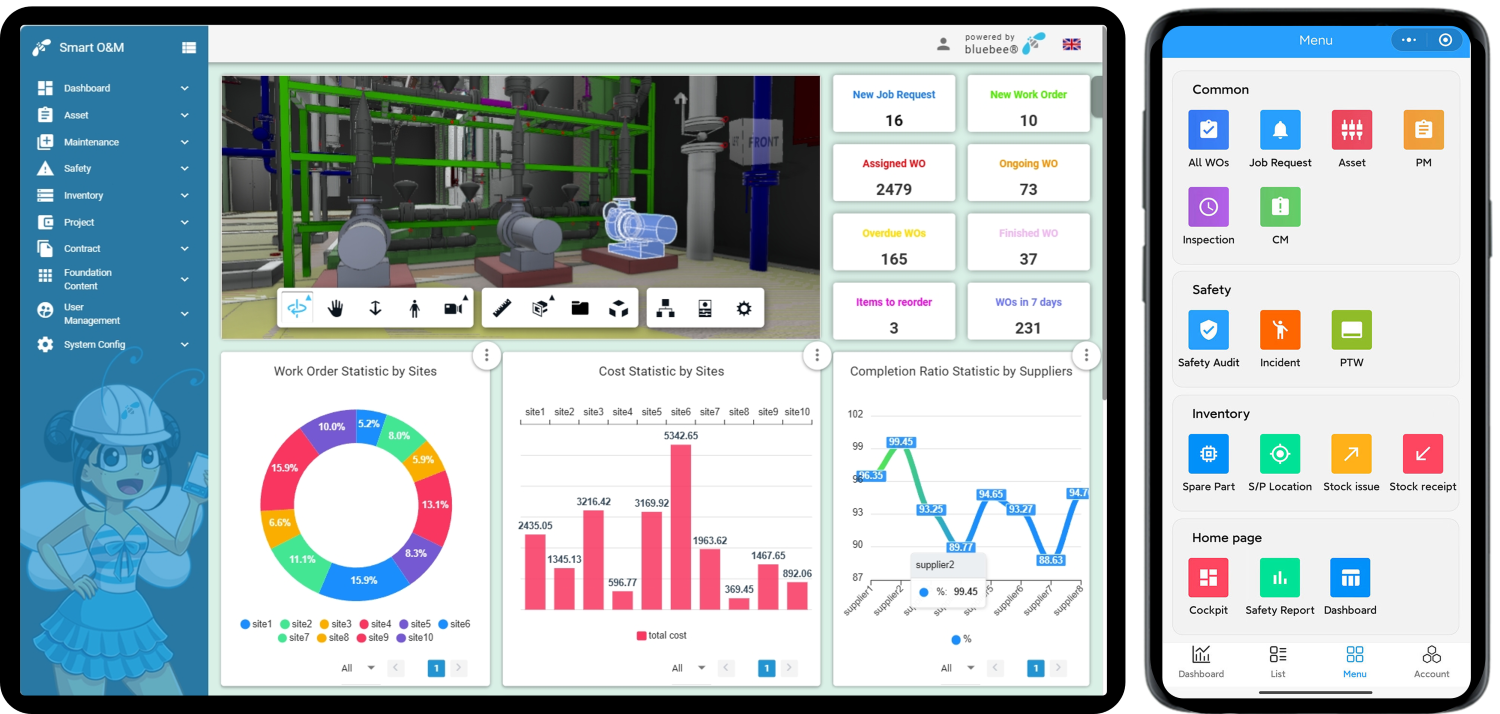
Flexible configuration: Shaping business architecture on demand
●
On demand activation of functional modules
Enterprises may enable or disable functional modules in line with their business scope, organizational structure and maintenance requirements, building customized feature combinations.
●
Differentiated user homepage setup
Dedicated work homepages can be configured for distinct user groups to enable targeted information distribution. Management oriented homepages aggregate global data overviews, presenting task progress, key performance indicators and consolidated reports to support data driven analysis and decision making. Field workers see homepages focused on personal to do items and task lists, filtering out irrelevant information to boost day to day operational efficiency.
●
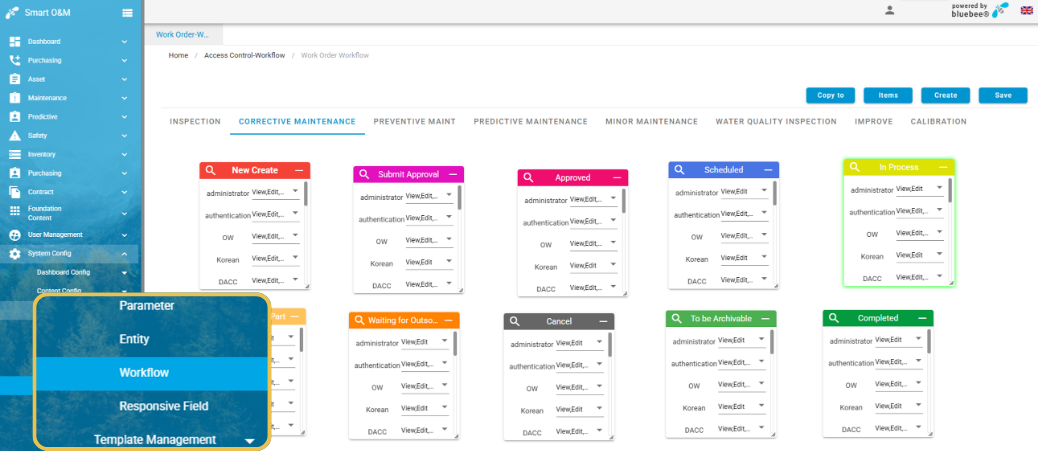
Visual workflow orchestration
Covering approval and routing processes across work orders, fault reporting, asset management and safety management, workflows can be fully defined according to internal management policies. The workflow engine supports complex business logic including conditional branching and rejection-and-resubmission rules. Users may rename process nodes and assign distinct status colors. Visual orchestration enables fast workflow setup so system procedures closely mirror on‑site operational standards.
●
Customizable form fields
Both bluebee® and Coswin 8i allow users to flexibly add and edit business data fields, supporting text, drop-down lists, numeric entries and other field types. Field labels, data ranges and validation rules are all configurable. This form capability removes the limits of rigid templates, supports differentiated data capture requirements, unifies entry standards and safeguards data quality. The intuitive drag-and-drop interface makes form building simple and efficient, significantly shortening form creation and iteration cycles while lowering ongoing administrative costs.
●
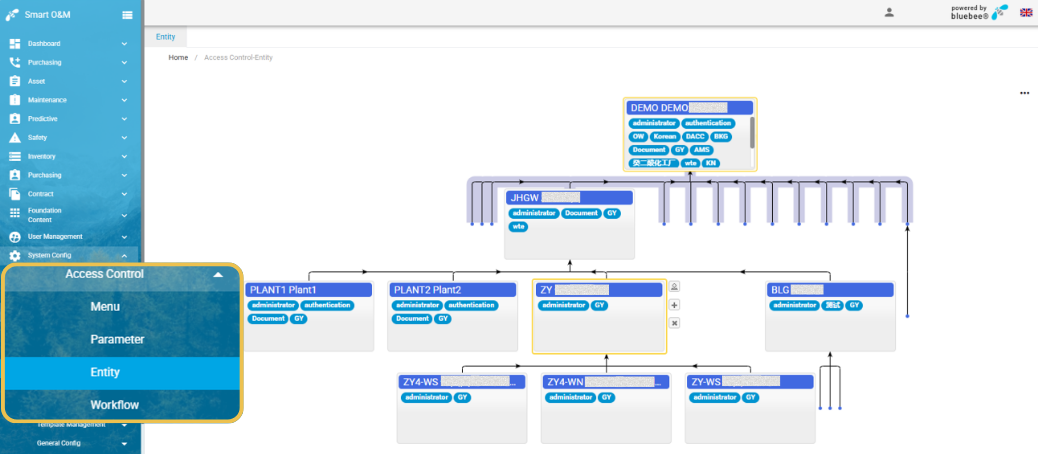
Tiered permission system management
Built around user group‑based centralized permission management, the Smart O&M solution delivers multi‑layered controls for data access, operational actions and form field visibility. It achieves data segregation and role-based privilege separation to prevent unauthorized operations and ensure data security and full auditability. Meanwhile, this permission framework simplifies permission maintenance when staff roles change within the organization.
●
Centralized site wide configuration
Enterprise‑wide settings cover uploading corporate logos, customizing login page backgrounds, enforcing password complexity rules and setting account lock‑out policies after login failures. All operations are completed within a single unified configuration interface without cross‑page navigation, streamlining site administration.
User friendly: Adaptive operation interface for diverse users
●
Multilingual support
Coswin 8i and bluebee® altogether fully support 31 languages: English, Italian, French, Romanian, Chinese, German, Spanish, Brazilian Portuguese, Greek, Slovak, Polish, Russian, German-Switzerland, Serbian, Persian, Bulgarian, Korean, Macedonian, Japanese, Turkish, Kazakh, Ukrainian, Arabic, Portuguese, Finnish, Hungarian, Czech, Dutch, Thai, Khmer, Mongolian. Instant language switching accommodates overseas subsidiaries, cross-border projects and multi national teamwork. This capability reduces cross language communication barriers and underpins global digital asset management roll out.
●
Flexible interaction settings
The solution delivers rich adjustable interaction options to accommodate varied user habits.
✓
Quick access navigation: Users configure custom jump targets linking either to internal system pages or external web pages. Fewer page transitions improve daily workflows for asset lookup, equipment management and data reconciliation.
✓
Layout selection: Record detail pages offer two display modes – labels on the left with values on the right, or labels at the top with values below. Users select layouts according to screen width, reading preference and field density to optimize reading efficiency.
✓
Embedded tabbed pages: Frequently used business pages run as embedded tabs inside the platform. Users toggle between multiple documents and reports without leaving the system, ensuring coherent data viewing.
✓
Icon text button toggle: Action buttons on lists and detail pages switch between icon only and text only modes. Icon mode conserves screen real estate for frequent operations; text mode reduces mis operation risks and improves discoverability for infrequent or complex functions.
●
Visual language adaptation
Extending beyond functional content, this platform adapts its visual language as well, allowing adjustments according to user preference and working environment.
✓
Theme color switching: One click selection among dark, blue, green and other system themes. Dark themes support extended focused work; lighter themes suit open plan office environments.
✓
Sidebar background image replacement: Authorized users upload custom graphics such as corporate branding or team visuals as sidebar backgrounds to differentiate organizational units or working scenarios.
✓
Menu display mode adjustment: Navigation directories can be placed either in the left sidebar or within the top bar. Users choose the layout best suited to screen ratio, working habits and page content requirements.
Conclusion
A capable equipment management system is not measured by feature quantity, but by its capacity to grow alongside the enterprise. The Smart O&M platform built on bluebee® and Coswin 8i embodies this principle, unlocking system adaptability through its ultra‑customizable configuration and enhancing user experience through human-centric design. Organizations can rapidly deploy maintenance management platforms aligned with their governance rules and field operation scenarios, breaking free from constraints imposed by rigid off-the-shelf software – putting digital tools to work for business development and delivering lasting value in asset operations management.